
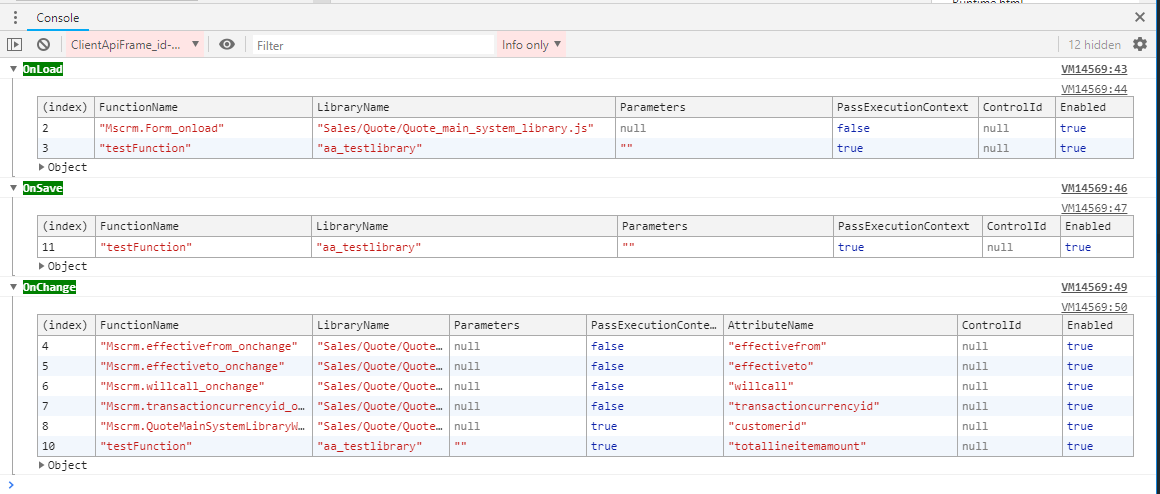
The below function show the events registered in a current form.
function getFormEvents(executionContext){
    var formContext = executionContext.getFormContext()
    var formItem = formContext.ui.formSelector.getCurrentItem();
    var formId = formItem.getId();
    var entityName ="systemform";
    var attributes = "formjson";
    retrieveRecord(entityName,formId,attributes)
    .then(function(result){
        showData(result.formjson);
    });
}

function retrieveRecord(entityName,id,attributes) {
    try {
        var selectString = "?$select=" + attributes;
        return Xrm.WebApi.retrieveRecord(entityName, id, selectString);
    } catch (e) {
        console.log(e.message);
    }
};

function showData(formjson){
    var formData = JSON.parse(formjson);
    var eventHandlers = formData.EventHandlers.$values;
    var onChange ={};
    var onSave = {};
    var onLoad = {};
    eventHandlers.forEach(function(event,index){
            switch (event.EventName) {
                case 'onload':
                    onLoad[index] = event;
                    break;
                case 'onchange':
                    onChange[index] = event;
                break;
                case 'onsave':
                    onSave[index] = event;
                break;
                default:
                    break;
            }
    });
    console.groupCollapsed('%cOnLoad','background:green;color:white');
    console.table(onLoad,['ControlId','Enabled','FunctionName','LibraryName','Parameters','PassExecutionContext']);
    console.groupEnd();
    console.groupCollapsed('%cOnSave','background:green;color:white');
    console.table(onSave,['ControlId','Enabled','FunctionName','LibraryName','Parameters','PassExecutionContext']);
    console.groupEnd();
    console.groupCollapsed('%cOnChange','background:green;color:white');
    console.table(onChange,['AttributeName','ControlId','Enabled','FunctionName','LibraryName','Parameters','PassExecutionContext']);
    console.groupEnd();
}
Add the function named getFormEvents in OnLoad event in order to get all functions registered in the current form.
After OnLoad event the function show the result in the browser console as below:
New Comment